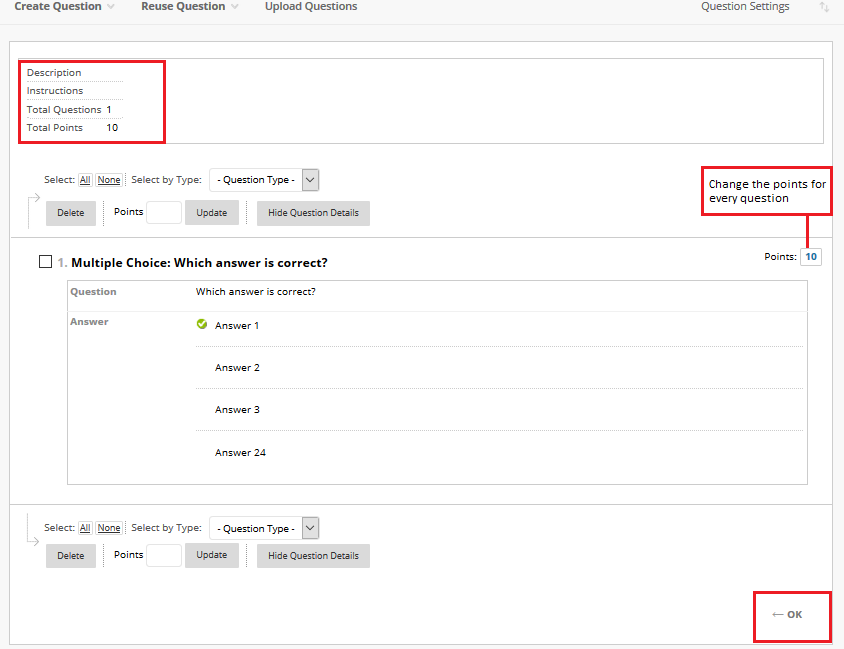
How Can I Change the Points for Test Questions? March 27, 2020March 27, 2020| Ahmed HamedAhmed Hamed| 11:44 pm| Categories: Blackboard For Instructors Tests & Question Pools On the Test Canvas page, next to each question you will find the Points assigned to the question. Type the points for every question. The Total Points for the test (at the top left corner) will be adjusted accordingly. Post navigation Previous Previous post: Next Next post: Related Posts March 29, 2020March 29, 2020 How to Manage Posting on a Forum Thread Managing Postings: When you manage a forum, you can grant discussion board roles (Participant, Builder, Manager, etc.) to members of ... Read MoreRead More March 7, 2020March 7, 2020 How Can I Send an Email to My Students from Blackboard? The email course tool allows you to send emails to your course members directly to their AUC email accounts within ... Read MoreRead More March 8, 2020March 8, 2020 How Can I View the Grade Center ? The Blackboard Grade Center is similar to a spreadsheet where each row represents a student in your course and each ... Read MoreRead More